Business & Management / Software & Digitalisation
What do you check for a flower shop program if you work from your phone and computer
What you check in a flower shop program on phone and computer: orders, roles, photos, printing and the ProFlorist portal.

When you choose a florist program, check each activity on the device you will do: taking the order by phone, organising the workshop, consulting the documents or setting up the subscription. The fact that a platform has both an application and a web portal does not mean that all functions are identical on all screens.
In the ProFlorist program for florists, the ProFlorist Florist application covers the operational activity of the florist. The browser portal has an administrative role, including for company, subscription and related documents. The customer app has a different purpose: product discovery, ordering and tracking. Presentation of Business functionalities explains the roles of the components.
Start from the activity and the person doing it
Write a short list of daily activities and assign a person responsible for each. The administrator may need the subscription offer and invoices. The person taking the orders needs the product, the recipient and the deadline. The florist in the workshop needs the work and the recipe. The courier needs the delivery information.
On your phone, swipe the table to the left to see all columns.
| Activity | ProFlorist component to check | Tracked result |
|---|---|---|
| Order Pickup and Tracking | ProFlorist Florist / Business application | Find the order, product and its stage. |
| Availability and catalog | Operational screens in the Florist application | You know what products the florist can prepare. |
| Teamwork | The production module available to the account | The job has responsible and execution information. |
| Delivery | The flow and application dedicated to the courier | The assigned person finds the delivery and updates the delivery. |
| Subscription and Commercial Administration | The Business Portal from the browser | Consult the offer and account documents. |
| Buying flowers | Public Catalog and Client Application | The customer chooses the product and the method of receipt. |
This is the starting point for the evaluation. Exact availability depends on account and package. Do not equate access to the subscription portal with a complete computer order operation program.
Test 1: Can you quickly find commands that demand attention?
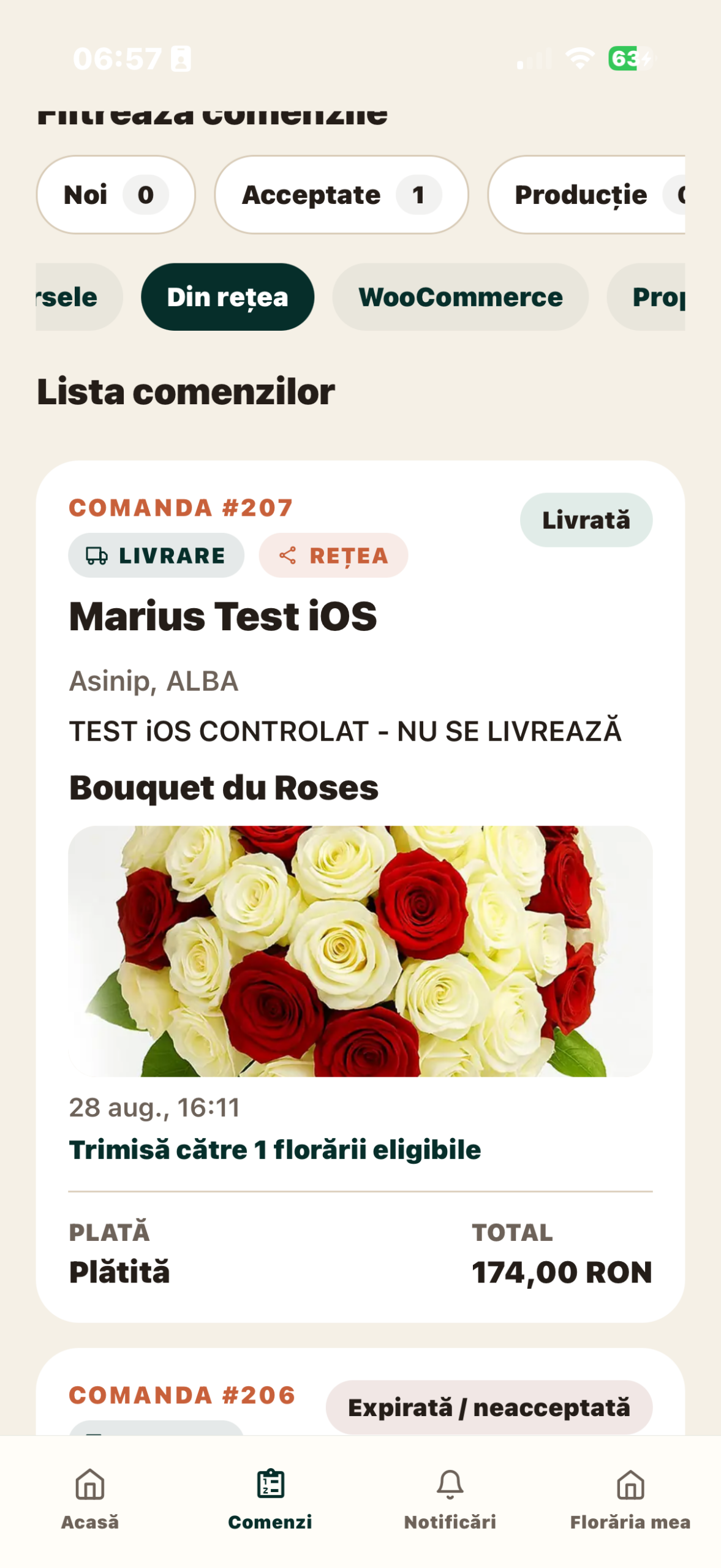
On the iPhone, the main ProFlorist Florist screenshows the command summary and access to their list. Navigation includes orders, notifications and florist administration. In the list of commands, check the separation of stages and sources.
Ask to see a new order, one in progress and one completed. Identify the mode of delivery and open the details. This test is more relevant than looking at a blank main screen: find out if you can quickly find exactly the job the client is asking about.
Also check for readability. Product name, variant and instructions must be readable without losing context. In the case of an order with a different customer than the recipient, see where the two people are shown and what information is required for delivery.
Test 2: can you see all the details of an order?
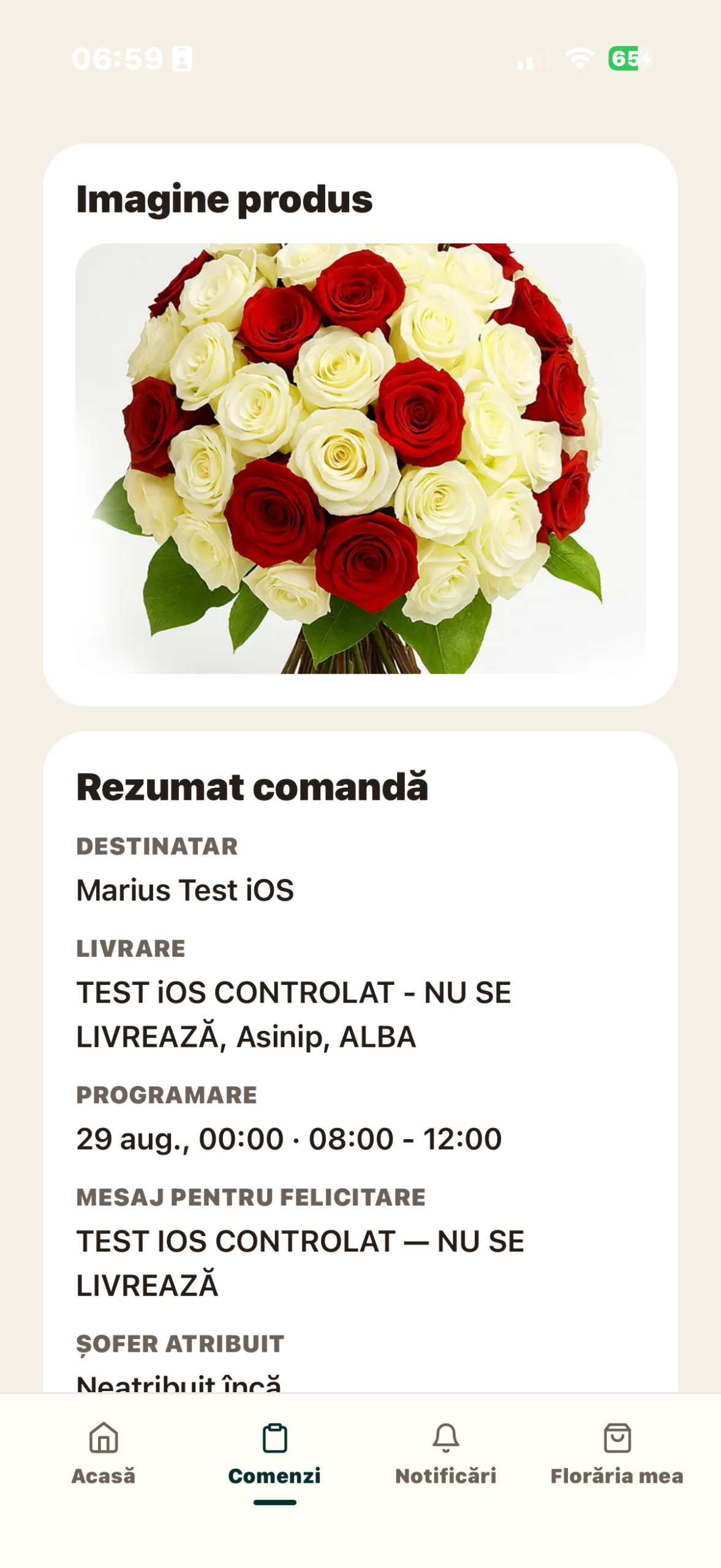
Open an available order in the demo account. It identifies the product and variant, the customer, the recipient, the message and the method of delivery. For delivery, check the address and range; for pick-up, follow the stages specific to delivery in the flower shop.
An order with a different customer than the recipient is a useful test: the person paying is not necessarily the person receiving the bouquet. Read the instructions and message for the card to see if they are easy to find on your phone.
Create your own orders is not yet released in the verified mobile version. If you need to enter phone or WhatsApp orders here, ask for confirmation of availability and a demo after launch. Do not infer the existence of the form just from the general description of the platform.
Test 3: Do you understand what was saved and what was updated?
In day-to-day activity, the phone can switch between Wi-Fi and mobile data. Check how the application indicates loading, confirmation and error. An already open screen should not be treated as evidence that an update has reached the server.
In ProFlorist, the order detail is reloaded after operational actions. Payment information has its own states. In a demo, watch what happens after the update and how the same command is reflected in the worklist.
Does not assume that the application can fully record and synchronize orders without the Internet. If working offline is important to your flower shop, ask for an explicit demonstration of this situation, on the version and device used. It also establishes the team’s procedure for a disconnection.
Test 4: what information reaches the workshop and the courier?
The same account opened on two phones is not automatically equivalent to a role system. Check each person’s access by their intended role and the functions included in the subscription.
ProFlorist production is available starting with Growth, and dedicated workflows allow for job management and accountability. The demonstration must show the product, the recipe, the notes and the completion. For courier, check the assignment and delivery information.
The testthe minimum is to trace a command from the admin list to the screen of the person executing it. Then ask to see where the completion information comes back. Avoid assuming that all roles see the same data or have the same actions.
Test 5: how to use the photo and the printer?
The witness photo is associated with an order and documents the finished product. It differs from the photo in the catalog, used to present the offer. Check where the image is attached, if it has been uploaded and if it can be found in the order detail.
If you are going to use labels, test the printer model provided in your offer with the phone the team is working on. Do not consider any Bluetooth printer compatible. In ProFlorist, the equipment is optional and configured separately, according to the extensions offer.
Separates the confirmation of an application operation from the physical result. A bouquet may be marked as a product and label printing may require a retry. Effectively verifies the label: product, identifier, legibility and number of copies. A useful demonstration also includes the case where the printer is not available.
Test 6: what can you actually do on the computer?
Open the Business portal and identify the offer, subscription and administrative documents. This is a separate route from the daily work in the Florist application. If an essential requirement is to take all orders from the computer, ask to see the exact screen and feed available before choosing.
The same principle applies to a tablet: the catalog for product presentation, the operator application and the workshop module have different uses. Check the screen orientation, text size and actions available on the device you will use.
If you have a WooCommerce store, also check the integration between your store and ProFlorist. Do not confuse access to the WordPress administration with the existence of an identical ProFlorist interface in the browser. The demarcation between management, invoicing and management helps you assign the right system to each operation.
What do you note at the end of the test
- Phone model, operating system and app version tested.
- The user role and package in which you saw the function.
- Operations demonstrated on phone, tablet and browser.
- Features that need additional integration, equipment or configuration.
- The way you recognize a completed operation and an error.
- Support steps when the team encounters a problem.
If the program replaces a table, also compare the costs and limits of working in Excel. For the final choice, use full list of questions and request a demo with your team’s devices and roles.
Articles from the same guide
- How to choose a florist program: questions to ask before subscribing
- Excel or program for florist? How do you compare organization, costs and limits
Sources and Availability
Documentation consulted on September 9, 2026: ProFlorist Business functionalities and roles, subscriptions and optional equipment. Screenshots from the Florist app illustrate screens on an iPhone 17, in ProFlorist Florist 1.0.2 (67); does not represent a certification of all devices. At this time, ProFlorist is in Beta, with commercial launch announced for October 26, 2026; the network does not honor public orders yet.
Related articles
More ideas from the same area

Business & Management / Florists & Stories
What commercial markup should I apply to flowers?
There is no universal commercial markup that is "correct" for all florists. A multiplier…

Business & Management / Florists & Stories
How to calculate the real margin on a flower bouquet
A practical method for calculating contribution margin from net revenue and the variable costs…

Business & Management / Software & Digitalisation
How to calculate the price of a flower bouquet correctly
A practical pricing method based on usable flower cost, greenery, consumables, direct labour, wastage…