Business & Management / Software & Digitalisation
Invoicing, inventory or florist management software: what each system does
The difference between invoicing, management and florist management. How documents, stock, orders and production are linked in ProFlorist.

An invoicing software organises sales documents. Inventory management software tracks goods and stock movements. Florist management software coordinates the activity around the order: the requested product, availability, team, preparation and delivery. These areas may overlap in the same solution, but must be checked separately.
For a florist, the useful question is “what operation remains uncovered?”. You can keep your bills well organized and still search your conversations for the greeting message. You can have the stock registered and still not know who is preparing the bouquet to be delivered in an hour.
The three roles, on the same command
Let’s take a demonstrative example: a customer orders a bouquet from the catalogue for another person, with delivery and a personalised message. This single sale generates several information needs.
On your phone, swipe the table to the left to see all the columns.
| Area | The main question | What you check in the demo |
|---|---|---|
| Billing | What document is issued, by whom and for what sale? | Customer data, product, value, issued document, submission and document status. |
| Management | What quantities came in, were consumed, or were left over? | Inputs, outputs, inventory, units of measure and documents used by the company. |
| Flower shop management | Who makes and delivers this order, when and according to what requirements? | Product, recipient, message, responsible, production, payment and delivery. |
The table separates the purposes, does not require the purchase of three applications. Some products include several modules; others connect to systems the firm already uses.
What the invoicing software does
Invoicing starts with the document: who sells, who buys, what is billed and what the value of the transaction is. Depending on the product and subscription, there may be features for sending documents, tracking receipts and connecting with other systems. Read the actual functions, not just the package name.
As an example of commercial demarcation, SmartBill presents separately billing product and invoicing management. This difference shows why the existence of a list of products on the invoice should not automatically be confused with a complete stock management.
For the florist, the invoice does not replace all execution instructions. The greeting message, the recipient of the flowers and the delivery instructions are operational information. The buyer and recipient may be different people, and the team needs to distinguish these roles.
What the inventory management software solves
Management tracks the movement of goods and related documents: inputs, outputs, consumption, transfers and inventory, according to the functions of the chosen solution. In the flower shop, the units of measurement also matter. Rods, packages, pieces of packaging and finished products cannot be mixed in one quantity without clear rules.
A bouquet adds a specific problem: the product sold is composed of several ingredients. Check how the system handles the recipe, consumption and product variants. A larger variant may have a different composition, not just a different price.
Some general inventory management softwares also include modules for recipes or production. For example, the SmartBill Management page features an additional module for composite products and production reports. So it is not correct to assume that only a software dedicated to florists can have recipes. The difference should be checked in the daily flow, on your product and team.
What does the operational management of the flower shop bring
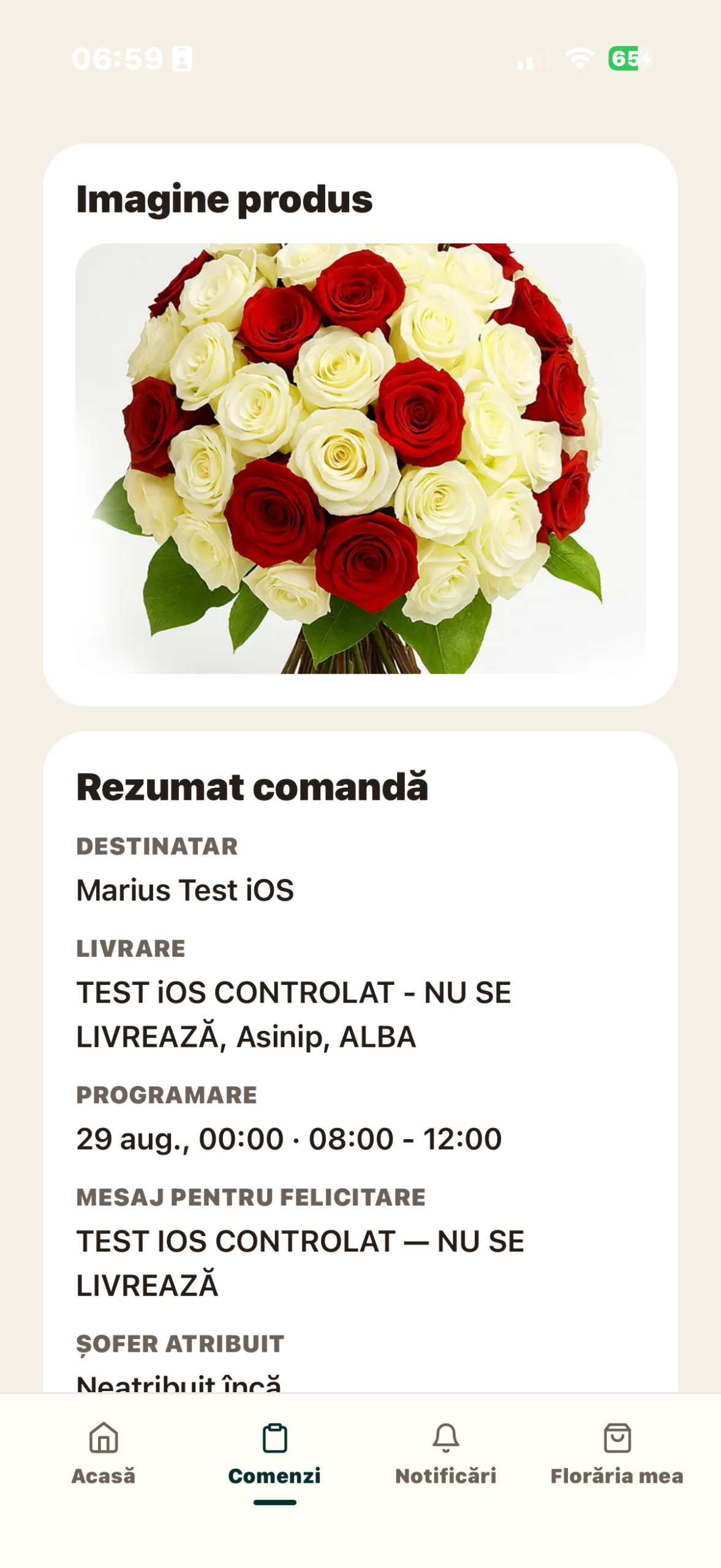
ProFlorist for flower shop management organises the activity around the order. In the Florist app, the order list and detail provides context for the work available to the account. The form for creating your own orders is not yet released in the verified mobile version; this guide does not list it as an available feature. The order detail links the product to the customer, recipient, message and delivery method. Execution status and payment status are tracked separately.
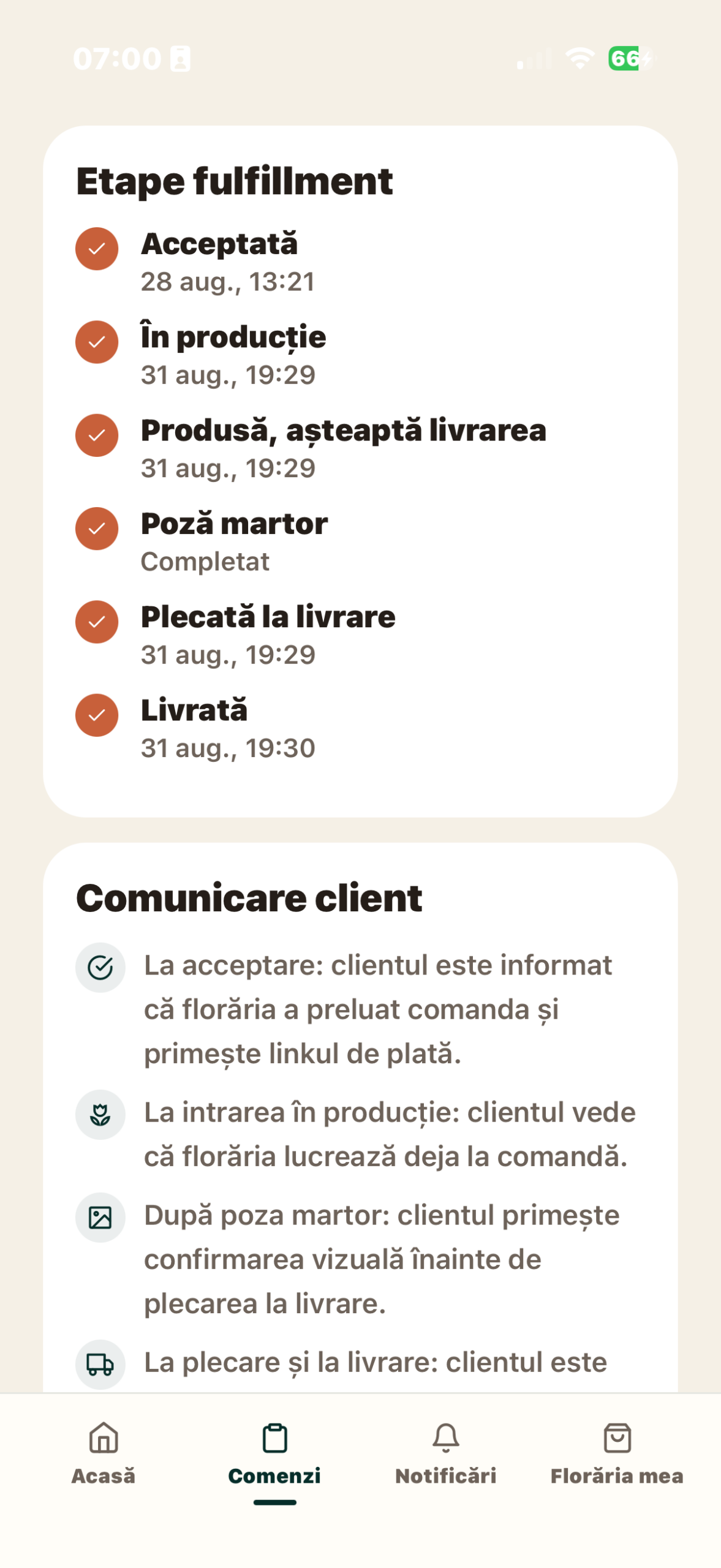
Depending on the package, the order proceeds to production and delivery. The production module includes work responsibility, recipes, notes and photography. For delivery, the assignment, address, current stage and proof of delivery are relevant. These roles are described in ProFlorist Business features.
For example, an invoice issued does not prove that the bouquet was prepared. A witness photo does not confirm that the payment has been collected. A product ready for pickup is not yet a delivered product. A useful system makes these distinctions visible to the team.
How ProFlorist relates to florist invoicing
ProFlorist has invoicing and order document functions depending on your account setup. The public documentation shows issuing or uploading the invoice and configurations for services such as SmartBill and Invoices, where available. Check the active provider and document path in your account.
There is a difference between issuing an invoice through an integration and uploading a document issued to another system. If the florist uses manual upload, the document already exists in its source. Attaching in ProFlorist associates it with the order; it should not be treated as a new issue or as evidence of a referral to another service.
It also separates the invoices to the florist’s customers from the ProFlorist subscription documents. The first ones belong to the sale of floral products; the others concern the software service. They can be consulted in the same ecosystem, but have different roles and issuer.
In the direct flow, the florist sells, collects and invoices the products to the customer. Cashing through your own NETOPIA or Stripe account and issuing the invoice are separate components. Roles for optional AYSA mediation are presented separately in platform terms and in the commercial offer.
Operational stock and document management
In ProFlorist, the availability of ingredients helps the workshop decide what products it can prepare. This question is close to the activity of the florist: “can I make the requested option today?”. The management system also aims to justify the movement of goods. The two perspectives must be reconciled in the organisation of the company.
ProFlorist features NEXUS ERP between configurable integrations and NEXUS Retail as a separate business extension. Do not assume that simply choosing a ProFlorist subscription activates any management function or any connection to the existing system. The conditions appear in the offer of subscriptions and extensions.
In a demo, it asks you to follow a single recipe and its ingredients. Where is the initial quantity recorded? Who updates availability? What operation produces a document in the management system? If an integration is not configured, make it clear which step remains manual.
What do you check before changing an existing system?
- Documents: inventory what you issue and what the accountant needs to receive. Confirm the system where each document remains.
- The products: check names, codes, variants and units of measure. The same name does not guarantee that two listings represent the same product.
- Payments: track where the receipt appears and how it relates to the order.
- Execution: check the person in charge, the recipe, the photo and the teaching step.
- Exceptions: test what happens when the document cannot be issued or information is missing. The team must distinguish an error from a completed operation.
Don’t issue the same invoice in two systems just to fill out two screens. First determine where the document is issued and by what mechanism it is associated with the order. Involve the person in charge and the accountant in defining this route.
How to choose the right combination for your flower shop
If the main problem is the issuance of documents, the assessment begins in the billing area. If you can’t track inputs, consumptions and inventory differences, check management. If the problem is order coordination between picking, shop floor and delivery, evaluate the operational flow.
You can keep a well-functioning financial system and add operational organisation if the integration or manual steps are clearly established. Start with the questions for choosing the software and request a ProFlorist demo starting from an order and the documents used now.
Articles from the same guide
- How to choose a florist software: questions to ask before subscribing
- Excel or florist software? How do you compare organisation, costs and limits
- What do you check for a florist software if you work from your phone and computer
Sources and availability
Product documentation consulted on 9 September 2026: ProFlorist — functionalities, subscriptions, commercial roles; SmartBill — Billing and Management. The examples describe the software organisation, they do not set out the accounting treatment of the transactions. ProFlorist is in Beta, with commercial release announced for October 26, 2026; the network does not honor public orders yet.
Related articles
More ideas from the same area

Business & Management / Florists & Stories
How to calculate the real margin on a flower bouquet
A practical method for calculating contribution margin from net revenue and the variable costs…

Business & Management / Florists & Stories
What commercial markup should I apply to flowers?
There is no universal commercial markup that is "correct" for all florists. A multiplier…

Business & Management / Software & Digitalisation
Excel or flower-shop software? Comparing organisation, costs and limitations
A practical comparison of spreadsheets and dedicated flower-shop software. Product functions, packages and availability…